Month 1
48%
About This Month
Day 1
Day 2
Day 3
Day 4
Day 5
Day 7
Day 8
Day 9
Day 10
Day 11
Day 12
Day 13
Day 14
Day 15
Day 16
Day 17
Day 18
Day 19
Day 20
Day 21
Day 22
Day 23
Day 24
Day 25
Day 26
Day 27
Day 28
Day 29
Day 30
Create ConvertKit Visual Automation
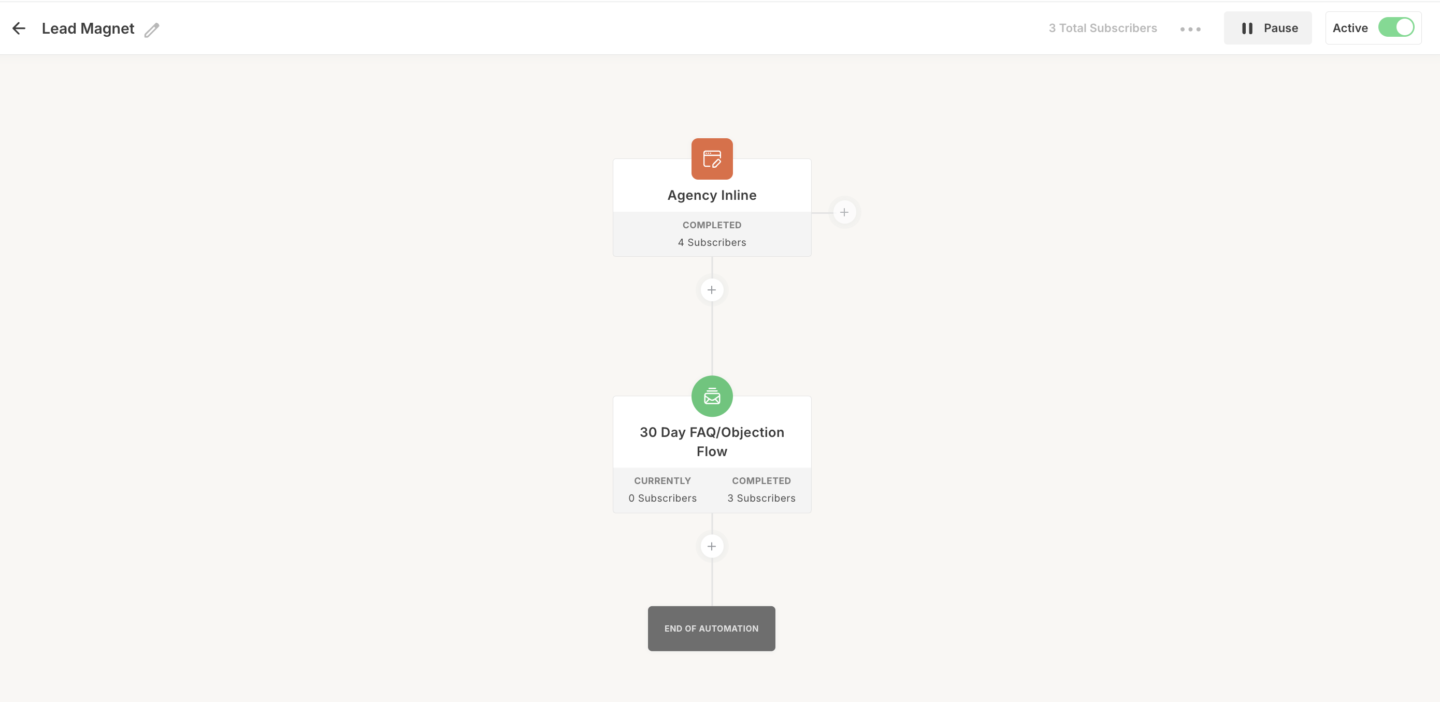
Finally, we need a Visual Automation inside ConvertKit. This is what will connect the Form we created to the Sequence so when people sign up to the form, they automatically start receiving our emails.
1. Log In: Access ConvertKit and go to Automate > Visual Automations.
2. Create New: Click + New Automation and select Start from Scratch.
3. Add Form: Choose your form as the entry point.
4. Add Sequence: Click +, select Action > Email Sequence, and connect the sequence you created.
5. Activate: Toggle the automation from Paused to Live.
ConvertKit Documentation:
https://help.kit.com/en/articles/2502666-how-to-use-kit-visual-automations