Buying 30 cold email domains and emails would allow you to send about 50 cold emails per day at the very most. This means you would send 1,500 emails per day.
This is not a random number. You can usually get one qualified call per every 1,500 cold emails you send, so you should get about five calls per week (sending Mon - Fri) with this amount.
Step #1: Buying The Domains
Follow these instructions and criteria exactly or you may mess it up:
Buy 30 cold email domains similar to your main domain. For example, my domain is 1000xleads.com. I have try1000xleads.com, get1000xleads.com, 1000xleadsprogram.com, and so on.
Make sure they are all .com
Make sure they are all from GoDaddy. This is the best option. Don't use Namecheap or budget registrars as they are cheap for a reason and your delierability will suffer.
There should be no - such as http://conversion-pages.com
There should be no weird replacements such as http://hell0.com instead of http://hello.com
Do not use marketing buzzwords when possible
Step #2: Buying The Emails
When you go to the checkout, add 30x email addresses and pay for them annually up front. It should be $19 or so when you pay annually with the discount as opposed to $7.99 per month without it. You will save thousands of dollars per year this way.
So, my emails are all:
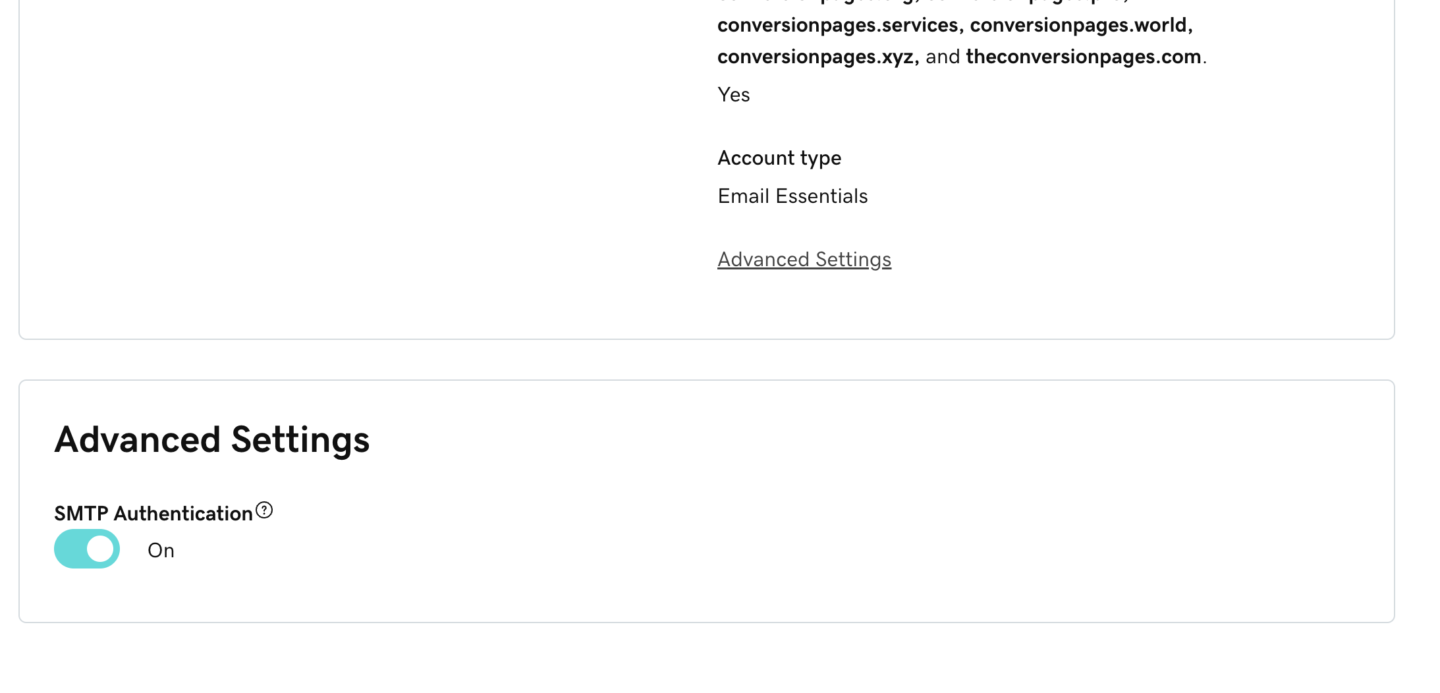
Step #3: Turn on SMTP
(This will be different for other providers. Google those instructions if you use something else)
To reach the SMTP Authentication setting in GoDaddy:
1. Log in to your GoDaddy account.
2. Go to Email & Office Dashboard.
3. Select your email account.
4. Click on Advanced Settings.
5. Toggle SMTP Authentication to “On” (as shown in the image).